Skip to content
Angels Print
Search products…

Packaging guide

How to Measure a Box

Separate the space your packed contents need from the box’s outside footprint, then keep the flat artwork view distinct from the assembled shape.

Inside size and outside size answer different questions

Usable inside dimensions tell you how much room the packed arrangement has. Outside dimensions describe the space the closed package occupies. Material thickness, closure style and construction affect the relationship; do not subtract a guessed board thickness.

  1. Arrange the product as it will go into the box, including wrap, dividers or inserts already in place.
  2. Measure the arrangement in that orientation: longest side, perpendicular side, then upright height. Record units.
  3. Choose any packing clearance based on the real contents and packing method. Cushioning or inserts may change the usable space needed.
  4. For an existing box, measure across the inside faces for usable space and across the outside faces for its outer footprint. Keep the two sets labeled.

The amount of extra room is project-specific. No fixed clearance or board thickness is assumed here.

Length, width and height on an assembled boxA schematic box. L and W follow its two perpendicular base edges, and H follows its vertical edge. Diagram is not to scale.LWH
L = length · W = width · H = height. Schematic only; not to scale or product dimensions.

Two different views

A flat artwork layout is not the assembled box

The assembled view helps explain the three box dimensions. Flat artwork is arranged across panels before cutting and folding. Solid cut edges separate the blank from surrounding board; score or fold lines mark where panels turn. Their positions, glue areas, flap shapes and print orientation depend on the exact construction.

Conceptual flat box panels and foldsFour body panels and a narrow closure area. Solid outlines are conceptual cut edges; dashed internal lines are conceptual folds. This is a schematic, not a production dieline.1234
Panels 1–4 form the body. Solid = conceptual cut edge; dashed = fold or score. Flaps and closure vary by construction. Schematic, not to scale; not a cut-ready or approved dieline.

Use the approved production dieline for panel placement and artwork. This conceptual diagram has no allowance, scale, cut path, print-safe zone or SKU approval.

Apply the guide to the box you are ordering

Corrugated Mailer Boxes

Choose the configured width, height and depth for the custom mailer, then measure the contents and any inserts in their packed orientation. The public specification does not say whether those numbers are inside or outside measurements.

Before layout, request the dieline for that exact size and confirm the closure and assembly, dimension convention, board specification, cut/crease/glue legend, artwork bleed and safe area, and fit tolerance. Fold and close a blank from the approved dieline before judging a close fit.

A Packhelp supplier reference is available in the product configurator for width 8, depth 6, height 4 in, Standard White and Outside and Inside printing. Its dimensions are outside measurements; interior capacity and final construction still need confirmation.

View box & planSupplier product reference
Tuck Top Boxes

Select the configured width, height, depth and straight-tuck or reverse-tuck option. These are different closures; the public listing does not label its dimensions inside or outside or publish a flat production layout.

Request a dieline matched to the exact dimensions and selected tuck direction. Check its cut, crease and glue areas, board specification, print orientation, bleed and safe area. Fold a blank from that approved layout and check the packed contents; ask for the supplier's tolerance before relying on a tight fit.

A project-basis external reference is available in the configurator for nominal 1 × 4 × 0.5 in catalog size (W × H × D), 14PT and an 8 mm glue seam. It is a project design study; the vendor’s dimension convention for SKU 713 remains unknown.

View the 1:1 project referenceView box & planSupplier product reference

The planner estimates required interior space from your entered contents and your own allowance. It does not verify a selected SKU’s fit or create a dieline. The two supplier references list configurable ranges but provide no dimensional tolerance; no fit margin or manufacturing tolerance is assumed here.

Original educational prototype

See how a straight-tuck carton folds

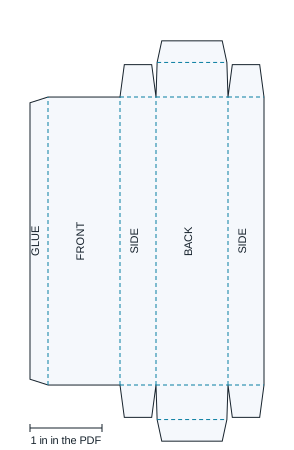
Four wall panels wrap into a tube with a narrow glue seam. The two side dust flaps turn inward before the broad closure folds over them. Both tuck tongues in this study hinge from the same back wall and slip behind the front wall.

The downloadable paper study uses width 1, depth 0.5 and body height 4 in measured between fold centres. It assumes zero material thickness. These are nominal study dimensions, not usable inside space or finished outside dimensions, and do not establish the dimension convention of tuck-top box 713.

  1. Print the PDF at Actual size / 100% and check its 1 in ruler. Cut the solid outline and fold the dashed lines.
  2. Wrap the wall panels and attach the narrow glue tab inside the opposite side panel.
  3. Fold the side dust flaps in, then the broad closure, then the tapered tongue. Close the other end the same way.
Download the 1:1 paper-study PDF

Educational paper prototype, not an approved production dieline or artwork template. It has no slit locks, bleed, safe area or board/crease compensation. Physical assembly, closure retention, fit and load capacity have not been tested. Request the exact production dieline for your selected size and tuck direction before print layout.

Original paper-study net with front, back, two sides, a narrow glue tab, side dust flaps and two tapered tuck tongues
Original Angels Print study drawing. Solid = cut; dashed = fold. Screen preview is scaled; use the PDF and ruler for 1:1 paper work.

Construction reading: Peczuh Printing’s Folding Carton Styles Guide. The study geometry is our own; the manufacturer’s drawing and locking design are not reproduced.

Continue preparing the artwork

Further reading

Packaging manufacturers explain common measurement and dieline concepts. Their dimensions, tolerances and templates apply to their own products and do not approve an Angels Print SKU.

Box measurement questions

Should I measure the inside or outside of a box?

Measure the usable inside space when checking whether contents fit. Measure the outside when planning shelf space, shipping or storage. Board thickness and construction affect the relationship between them, so do not convert one to the other without the box specification.

How do I measure contents for a box?

Arrange the items as they will be packed, including wrap and inserts that are already part of the arrangement. Measure the longest side as length, the perpendicular side as width, and the remaining upright dimension as height. Decide and record any extra space you want around the arrangement; the needed amount depends on the product and packing method.

Are the online dimensions for mailer box 867 and tuck-top box 713 inside measurements?

The current configurators show three dimensions but do not label them as inside or outside measurements. Check the approved construction specification for usable interior size before relying on a close fit or designing an insert.

Can I use a generic flat box diagram as my print template?

No. A flat net only explains how panels relate. Cut paths, score or fold positions, glue areas, panel orientation, board allowances and print-safe areas depend on the exact box style and production specification. Use the approved dieline supplied for the selected construction.

What should a box dieline include before I place artwork?

Match the dieline to the exact product, dimensions and closure style. Confirm which dimensions are inside versus outside; identify cut, crease and glue areas; and follow the supplier's bleed and safe-area instructions. Mailer 867 offers a Packhelp white, double-sided reference for outside dimensions of 8 × 6 × 4 in when the selected options match. That reference does not establish usable interior space or the final production dieline. Ask for the fit tolerance if the contents have a close fit.