

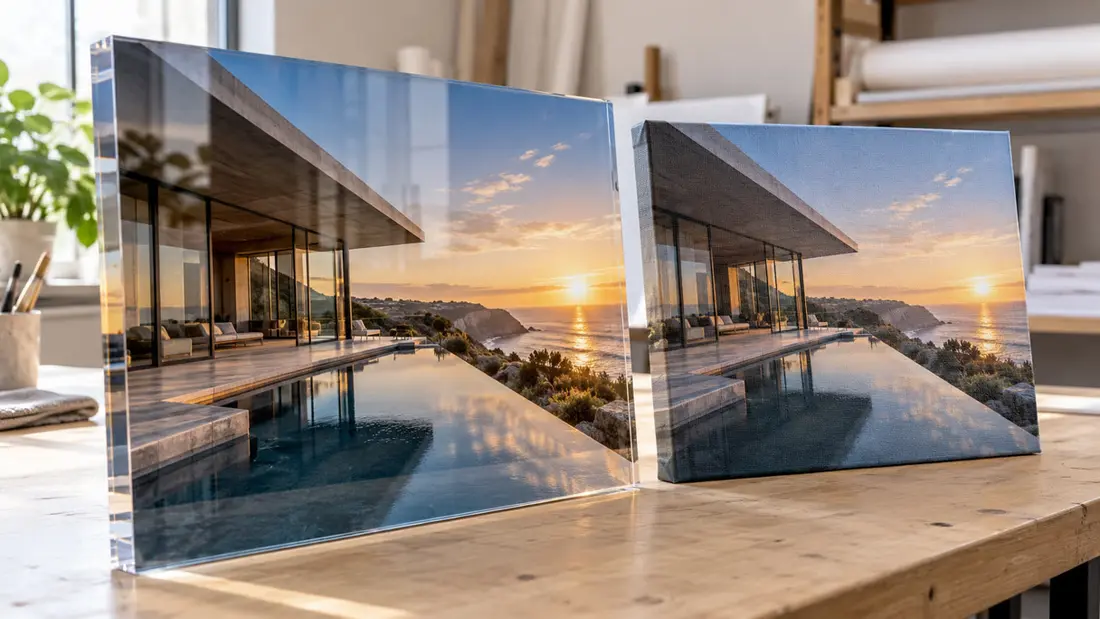
What is acrylic photo printing? It's a photograph displayed on a rigid acrylic panel, either printed directly onto the material or printed separately and attached behind it. The construction makes a difference. Angels Print offers printing onto acrylic, including front-surface and rear-surface options for clear panels.
What is acrylic photo printing: direct print or photo mounting?
Direct printing puts ink onto acrylic. With a front-surface print, the image sits on the viewing face; rear-surface reverse printing places it behind clear acrylic, so you see it through the panel. The viewing surface changes the presentation.
Photo mounting uses a separate photographic print bonded behind clear acrylic with an adhesive system. The photograph remains a separate layer. Don't assume every acrylic photo print uses photographic paper, or that mounting and direct printing reproduce the same file identically.
Check the product's process first. Angels Print's Acrylic Printing product lists Front Surface (Direct Print) and Rear Surface (Reverse Print) for clear material. Photo mounting isn't listed. Our UV Printing service is associated with this product; confirm the material and print surface before preparing artwork for a particular viewing effect.
Which look suits your photograph?
Clear acrylic has no visible canvas weave. Viewing a rear-printed image through it can give the photograph a sense of depth, which may suit fine architectural lines or a detailed close-up. Source detail still matters. The photograph needs enough resolution for the chosen size.
Canvas makes texture part of the picture. That weave is especially apparent nearby and can make a portrait feel softer, but it won't fix an out-of-focus file. Choose texture for its appearance. Don't expect it to conceal every image problem.
Canvas Wrap uses White Artist Canvas and offers mirror, white, black or fold edges. Consider the visible edge early. Its relationship to the photograph and wall can help you choose a presentation before settling construction details.
Framed Canvas Wrap adds a border in Black, Off White or Pecan. The texture remains visible. A dark frame can separate a pale image from a pale wall, while a lighter frame may feel less prominent beside nearby furniture.
Will reflections interfere with the image?
Check the wall first. Smooth, glossy acrylic can reflect a window or bright fixture, obscuring parts of the photograph from certain positions. Dark areas make reflections especially noticeable. Look from where you'll sit or stand.
Canvas generally scatters light more than smooth, glossy acrylic, which can help in rooms with troublesome reflections. It isn't necessarily reflection-free. The canvas options don't establish a particular coating, and choosing a frame doesn't establish glazing.
Frosted doesn't automatically mean anti-glare. Angels Print lists 1/4-inch Frosted acrylic, which changes how light passes through the panel. Confirm its suitability for your photograph before using it to address reflections. A separate matte coating for clear acrylic isn't established by the catalogue.
Where should you display the finished photograph?
Viewing distance changes the decision. Judge a living-room photograph from the sofa and close up; in a hallway, check the angles someone sees while passing. A clear head-on view may catch side reflections, while canvas texture tends to become less noticeable farther away.
Tell us about sun or dampness. The supplied options don't establish outdoor suitability, moisture resistance or a fade-life rating for these finished products. Acrylic's material properties alone don't establish how the complete printed piece performs in those conditions.
Which size and material should you order?
Start with your wall measurements. Acrylic Printing accepts custom dimensions up to 48 inches wide and 96 inches high, with a default of 24 × 24 inches. Shapes include Rectangle, Circle and Custom Shape. A circular composition can exclude details near the corners of a rectangular photograph.
Thickness and color are separate decisions. Clear and White acrylic each come in 1/8-, 1/4- and 1/2-inch thicknesses; Black comes in 1/8 and 1/4 inch. These aren't interchangeable photo finishes. Clear permits viewing through the panel, while opaque material changes that presentation.
Print-side choices depend on material. Clear acrylic offers front, rear or front-and-back printing; other materials have their own selections. Ask how opacity and white areas will be handled. The material name doesn't establish white-ink treatment or a backing layer.
Canvas Wrap lists sizes from 8 × 10 through 36 × 48 inches, plus custom sizing within its stated limits. Framed Canvas Wrap lists 16 × 16, 16 × 24, 24 × 24 and 24 × 36 inches. Allow room for the frame. Confirm finished outside dimensions before fitting it into a tight opening.
What do the starting prices actually cover?
The starting runs differ. Acrylic Printing starts at $1080.00 for the default run of 10 pieces, while Canvas Wrap starts at $1011.98 for the default run of 66 pieces. Framed Canvas Wrap starts at $1030.72 for the default run of 18 pieces. These aren't matched single-photo quotes.
You can select one piece. All three supplied quantity menus include 1, so choose your quantity and compare equivalent image sizes with confirmed configurations. Size, acrylic thickness and printed sides can affect cost. Include frame selection and optional hardware in that comparison; checkout pricing is final for the selected configuration.
Hardware needs its own check. Acrylic drilling and standoff options depend on other selections, so confirm what's included without assuming hardware arrives installed. For process background, read UV Printing in Van Nuys: What Gets Printed Directly Onto the Material, and What Doesn't.
How should you prepare the photograph?
Use your highest-quality original file. Check raster resolution at the final print size, since enlarging a small image spreads the same pixels over more space. Review the intended crop too. This matters especially when moving from a rectangular photograph to a square or circular display.
Follow the upload's listed file types, bleed and safe-area requirements for your selected product. Ask about any missing specifications. For rear printing, confirm artwork orientation before reversing the image yourself. Uploading or previewing a file doesn't confirm production readiness.
Arrange review before you pay. A digital proof is available on request, but manufacturing starts immediately after payment. Screen colors aren't an exact print match. Request a hard proof for critical color, particularly if subtle skin tones or shadow detail drive your choice.
Order your photo display online, or call Angels Print at (818) 806-9006 to confirm material and print-surface choices along with artwork requirements before payment. You can also discuss your photograph and display location at 8511 Lankershim Blvd, Sun Valley, CA 91352. Pickup is always free.
Frequently asked questions
Is acrylic photo printing the same as mounting a photo?
They use different constructions. Direct printing puts ink onto the panel; photo mounting attaches a separately printed photograph behind clear acrylic. Angels Print lists printing onto acrylic. A photo-mounting service isn't listed.
Does acrylic photo printing have glare?
Smooth, glossy acrylic can reflect windows and lamps, with the effect depending on lighting and viewing angle. Check your normal viewing position. Large dark areas in a photograph can make reflections especially noticeable.
Is acrylic or canvas better for photographs?
Acrylic suits a smooth presentation where fine detail matters, while canvas adds texture that can soften the appearance. Room reflections matter too. Framed canvas adds a border but retains the underlying canvas texture.
Can I order just one acrylic photo print?
Yes, the quantity menu includes 1. Angels Print's listed acrylic starting price covers a default run of 10 pieces. Select your size, material and quantity to see the price for your configuration.