

Deciding what to include in a holiday catalog starts with the buyer's questions. What's included? What does it cost? How do I order? Answer with clear gift groupings, consistent descriptions, prices, product codes and accurate photographs. Add ordering instructions, contact details and verified promotional dates so readers can compare gifts without guessing.
Start with one approved product sheet. For your 2026 catalog, give each item a row with its current information and the person responsible for checking it. Correct the sheet before arranging pages. That helps prevent conflicting prices or descriptions in different parts of the layout.
How should you organize gifts for quick decisions?
Choose groups that match how someone shops, such as gifts for hosts, small thank-you gifts or gifts for a particular interest. Budget groups work too. Every item must fit the printed price limit, though. Use one main organizing method, with page references for products that also fit elsewhere.
Keep comparable items together. Two similar gift sets should list their contents in the same order and use matching units for package sizes. Don't make readers turn several pages to discover that one set contains fewer pieces.
Label the holiday edition on the cover and give readers a reason to open it, such as the types of gifts inside. Add a contents guide if needed. Reserve back-cover space for your ordering address, store contact information and confirmed holiday hours.
What to include in a holiday catalog product entry?
Name and product code. Use a distinct name followed by the SKU or ordering code from your sales system. Keep the code beside the price. If variants have separate codes, make the relationship clear enough for someone ordering by telephone.
Comparable specifications. Include dimensions or capacity, material, available variants and package contents. Is it one item or a set? Say so plainly. Add care information that affects the decision, such as a textile's hand-washing requirement.
Price and availability. Print the approved selling price with its unit: each, pair or complete set. Explain additional retail-order charges. Confirm stock before including an item, and provide a way to check availability after distribution.
Reason to choose it. Give one useful sentence about the product's purpose or recipient. Skip unsupported superlatives. A removable cover or included storage pouch tells buyers more than calling everything a perfect gift.
What should an annotated sample spread show?
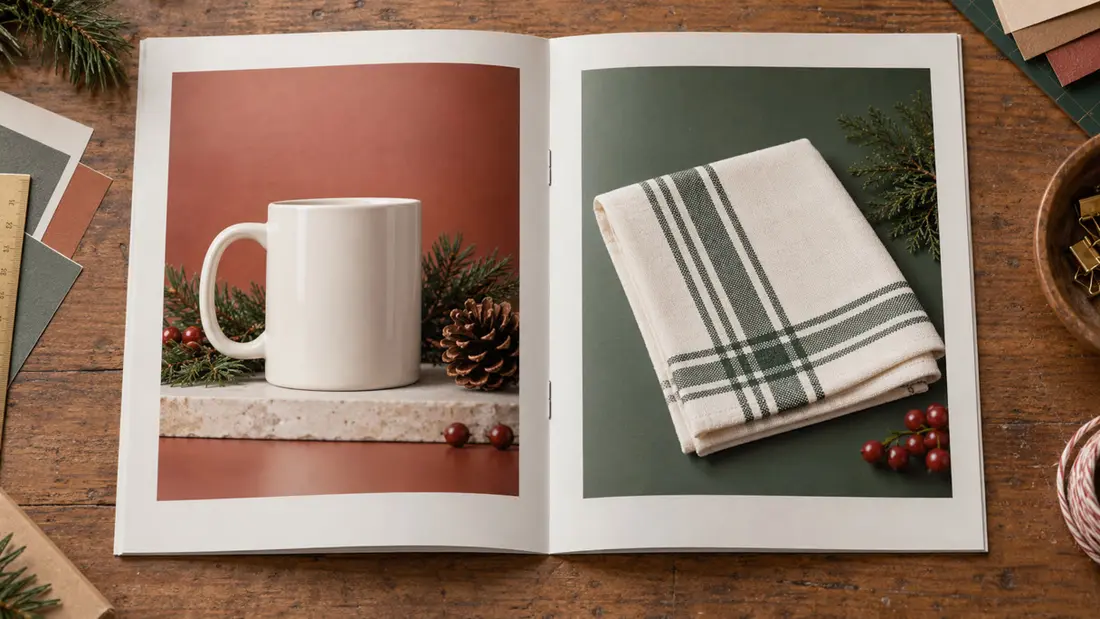
Use this two-page sketch as a layout reference. These are fictional retail examples. The mug and tea towel aren't Angels Print merchandise; italic placeholders mark information your store must approve before printing.
Left page, upper area: heading and photograph. Place “Gifts for Hosts” above a photograph of the mug and folded towel. The image introduces the grouping. A nearby caption should identify styling props that aren't included.
Left page, lower area: mug entry. Show “Ceramic Mug,” followed by approved product code, approved price each, capacity, dimensions, available colors and care instructions. Add a separate product photograph. It should make the handle, shape and purchased quantity easy to judge.
Right page, upper area: towel entry. Show “Tea Towel,” followed by approved product code, approved price each, unfolded dimensions, fabric composition, available colors and care instructions. Repeat the mug entry's positioning. Readers should find names, codes and prices in consistent places.
Right page, lower area: purchase instructions. Add a short shopping URL and a QR code linking to the featured collection, plus telephone ordering details if offered. State that items are sold separately unless you've approved a bundle. Put verified dates beside any offer.
Now read it as an order taker. Can you identify the requested variant and quantity without asking what the photograph means? Resolve ambiguity before adding decoration.
Which photographs help customers compare products?
Give each listing a clear product view, adding lifestyle photographs where they explain use or scale. Keep lighting and backgrounds consistent across comparable products. Heavy shadows can hide details. Different crops can also make similarly sized items appear very different.
Show the variant being sold. Label alternate colors, and check resolution at the final placed size because enlarging a small image reduces its effective resolution. Use photographs you own or are licensed to reproduce.
Keep labels clear of busy images. Screen colors aren't an exact match to print; request a hard proof for critical color. State whether gift packaging is included when it affects the purchase. For shipping preparation, see How to Package Holiday Gift Sets for Shipping.
Are your ordering instructions and offer dates verified?
Choose a primary ordering route. Test it from the finished artwork by scanning the QR code at its intended printed size and typing the URL manually. For phone orders, ask buyers to have the product code, variant and quantity ready.
Separate sale dates from holiday ordering deadlines. Have whoever controls checkout confirm promotional start and end dates, including the year and any time-zone cutoff. The offer must match the printed items and sales channels.
Have your fulfillment contact verify pickup deadlines and shipping statements. Carrier estimates aren't arrival guarantees. An online availability page can support printed information, but it doesn't excuse an incorrect catalog deadline.
Should you include a separate coupon card?
An optional Discount Coupon Card insert gives readers an offer to save or bring into your store. Its listed starting price is $1000.00. Confirm card quantity separately from booklet quantity. You'll also need to arrange who inserts them.
The offer must work on its own. Include store identity, redemption instructions, approved dates and applicable exclusions. Front Only or Front and Back printing is available, so the reverse can hold terms. Check compatible sizes, stocks and finishes in the configurator.
Which print choices and file checks affect the result?
Saddle Stitch Booklets start at $1000.66. Listed sizes include 5.5 x 8.5 inches and 8.5 x 11 inches. Test your busiest spread at actual size. A smaller format leaves less room for photographs and readable specifications.
Inside stocks include 100# Gloss Text, 100# Silk Text and 70# Uncoated. Cover choices include compatible gloss or silk stocks; finishes depend on other selections. Size, stock, quantity and added finishing can affect cost. Compare confirmed configurations at checkout. The starting price isn't a quote for your layout.
Base quantity on your distribution plan: store handouts, orders receiving catalogs and any confirmed mailing list. Our Magazine & Catalog Printing service is the relevant starting point. Don't order extras for unapproved products or offers.
Follow the selected product's upload requirements for file type, bleed and safe areas. Ask about missing requirements before preparing files. Check every price and code against your approved sheet; uploading or previewing artwork doesn't confirm production readiness. A digital proof is available on request. Manufacturing starts immediately after payment, so arrange needed review before paying.
Order online or use Custom Design for help arranging approved content. To discuss your configuration before checkout, call Angels Print at (818) 806-9006 or visit 8511 Lankershim Blvd, Sun Valley, CA 91352. Pickup is always free.
Frequently asked questions
What information should every holiday catalog product have?
Include a name, ordering code, approved price and clear photograph, plus dimensions or capacity, materials, variants and package contents. Keep the information order consistent. That makes similar products easier to compare.
How should I group products in a holiday gift catalog?
Group by a shopping decision, such as recipient, interest or budget. Keep similar gifts together. Use consistent specifications, and check that every item in a budget section fits its stated price limit.
What dates should I put in a holiday catalog?
Include verified promotional start and end dates, plus confirmed ordering or pickup deadlines where relevant. State the year and applicable cutoff time. Keep sale expiration separate from arrival information. Estimated delivery dates aren't guarantees.
Should a holiday catalog include a coupon insert?
Use a separate card if customers should retain or present an offer. Include store identification, redemption instructions, verified dates and exclusions. Confirm the card quantity separately. Decide who will insert it into the catalog.